
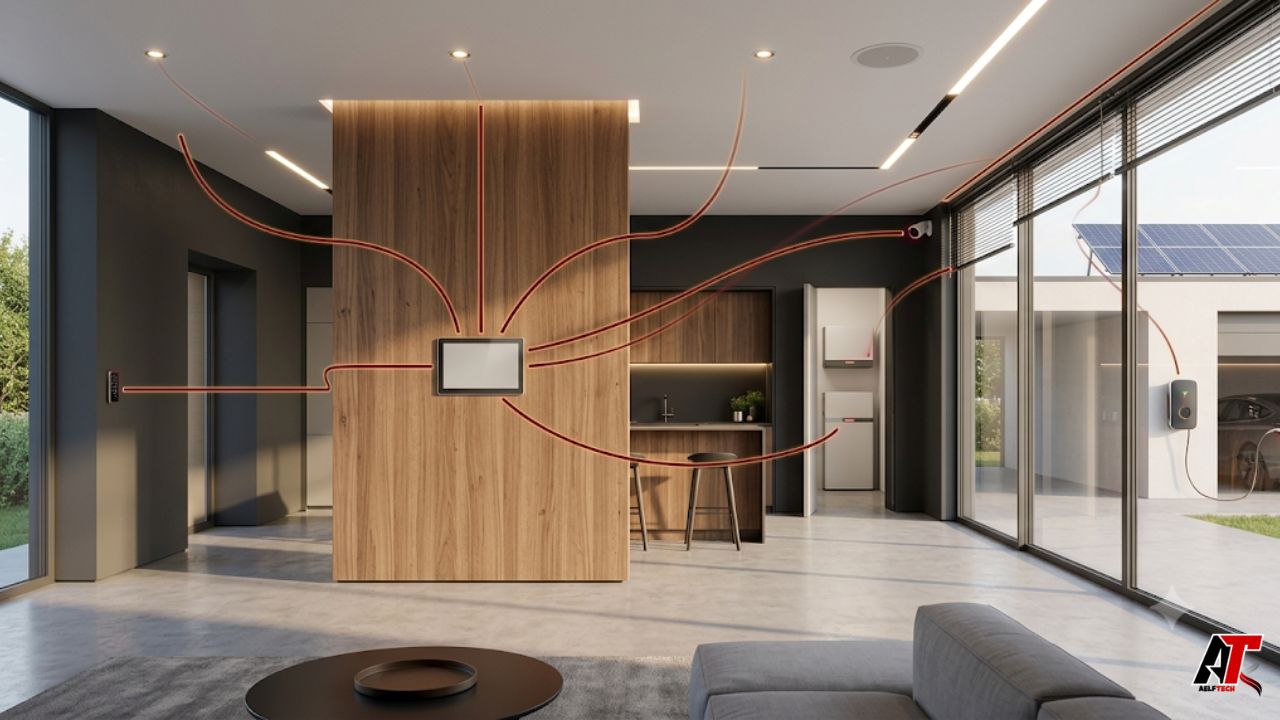
Loxone is an integrated home and building automation platform. It connects everyday systems such as lighting, heating, cooling, shading, security, access control, audio, and energy management so they can work together. Instead of controlling each device through a different app, Loxone uses one central automation system to coordinate the whole building.
The main idea is true automation rather than constant remote control. A Loxone installation can respond to occupancy, temperature, and energy conditions. Lights can adjust when someone enters, blinds can react to sunlight, and heating can reduce when a window opens. Manual changes remain available while routine decisions happen.
How Does Loxone Work?
A Loxone system has a central controller, connected sensors, output devices, communication technologies, configuration software, and a user app. The system receives information from the building, applies programmed logic, and then sends commands to the relevant equipment. This cycle happens continuously and can work locally without relying on a cloud service for its core automation.
1. The Loxone Miniserver
The Miniserver is the central control unit and the heart of a Loxone installation. It processes automation logic and connects functions that would otherwise operate separately. Depending on the model and project design, it can communicate with switches, motion or presence sensors, temperature sensors, lighting circuits, blinds, locks, alarms, HVAC equipment, meters, speakers, and other compatible devices.
Different Miniserver models support wired cabinets, compact installations, and wireless-first retrofits. Extensions can add interfaces, inputs, outputs, and other capabilities as the project grows.
2. Sensors and Actuators
Sensors tell the system what is happening. For example, a presence sensor can detect activity, a temperature sensor can report room conditions, a contact sensor can show whether a window is open, and an energy meter can report power use. Actuators perform the physical action, such as switching a light, moving a blind, opening a valve, activating an alarm, or controlling an electrical load.
Because these components share information, one event can trigger several responses. When the last person leaves, the system might switch off lights, lower selected temperatures, arm security, and report open doors or windows.
3. Loxone Tree, Air, Link, and Integrations
Loxone Tree is the company’s wired communication technology for sensors and actuators. It uses flexible cabling and is mainly associated with new construction or major renovations where dedicated wiring can be planned. Loxone Air is the wireless option and is useful when additional cabling is difficult, especially in existing buildings. Many projects use a hybrid combination of wired and wireless devices.
Loxone Link connects Extensions to the Miniserver. Gateways can integrate selected third-party systems, but compatibility and the depth of two-way control should be confirmed during design.
4. Loxone Config and the Loxone App
Loxone Config is the software used to plan and configure the automation logic. It includes predefined function blocks for common building tasks, along with testing, simulation, project analysis, and automatic configuration tools. This allows trained installers to create relationships between inputs, conditions, schedules, and outputs without building every function from scratch.
The Loxone App supports monitoring and manual control of rooms, lighting, temperature, access, security, audio, and energy information. It complements the automation rather than replacing it with constant button presses.
What Can Loxone Automate?
The platform can manage a wide range of building functions. The exact result depends on the equipment, wiring, configuration, budget, and goals of the project.
Lighting and Ambience
Loxone can control on/off lighting, dimming, color lighting, and preset scenes. Lighting can respond to presence, daylight, schedules, room use, or a chosen mood. A kitchen may use bright functional light during food preparation and softer light later in the evening, while corridors can illuminate only when needed.
Shading and Blinds
Automatic shading can react to the sun’s position, indoor temperature, weather conditions, and occupancy. Blinds or shades can reduce glare and overheating during the day, support privacy in the evening, and work with the heating or cooling strategy rather than fighting against it.
Heating, Cooling, and Ventilation
Room-by-room climate control can maintain different target temperatures based on use and schedules. The system can coordinate heating, cooling, ventilation, window contacts, shading, and presence information. This helps avoid obvious waste, such as conditioning an unused room at full comfort settings or heating while a window remains open.
Security and Access Control
Connected motion sensors, door and window contacts, access devices, lighting, shading, and audio can contribute to a coordinated security response. Depending on the installation, Loxone can manage alarm states, access permissions, door entry, audible warnings, lighting responses, and app notifications. Security design should still follow local codes and professional risk assessment; automation is not a substitute for required life-safety systems.
Energy Management
Loxone can measure and coordinate energy generation, storage, and consumption. In a suitable project, it may prioritize self-generated solar power, shift flexible loads, manage EV charging, control heating equipment, or reduce unnecessary consumption. The goal is to use available energy more intelligently while maintaining comfort and operational priorities.
Multiroom Audio and Other Functions
Audio can be integrated with rooms, scenes, alarms, and doorbells. Loxone can also support irrigation, pools, hospitality functions, and custom control tasks, which is why it is better described as a building automation platform than a set of gadgets.
Key Benefits of Loxone
- One coordinated platform: Lighting, climate, shading, access, security, audio, and energy can exchange information instead of working in isolation.
- Local core automation: Essential logic is processed by the Miniserver, reducing dependence on an external cloud connection for routine building functions.
- Less daily interaction: Good automation reduces repeated manual tasks rather than simply moving switches onto a phone screen.
- Scalable design: Extensions, networking, wired devices, and wireless devices allow the system to grow with the project.
- Consistent user experience: A shared app and control philosophy can simplify operation across different rooms and building systems.
- Energy-aware operation: Occupancy, schedules, temperatures, solar generation, storage, and electrical loads can be coordinated when the required equipment is installed.
Potential Limitations and Planning Considerations
Loxone is powerful, but it is not automatically the best choice for every property. A complete system usually requires professional design, electrical work, commissioning, and detailed discussions about how the building should behave. This is different from purchasing a few plug-in devices and setting up simple app-based routines.
The ecosystem is also more centralized and specialized than many do-it-yourself platforms. Homeowners should understand who will maintain the configuration, how future changes will be handled, which third-party products are genuinely supported, and what documentation will be provided at handover. Using a trained professional is especially important where the system controls mains electricity, locks, HVAC, shading motors, or safety-related responses.
Budget depends on building size, controlled circuits, sensor coverage, cabinet design, audio, access hardware, integration, and programming. Compare the total installed solution rather than one controller, because only a complete scope shows the real cost and value.
Is Loxone Wired or Wireless?
It can be either, and many installations are hybrid. Wired Loxone Tree devices are often preferred in new builds because wiring can be planned before walls are closed. Wired infrastructure can provide stable communication and centralized control, especially for lighting, shading, HVAC, and sensors.
Loxone Air devices are useful for retrofits, extensions, or areas where new cables would be disruptive. A wireless approach can reduce construction work, but radio coverage, battery maintenance, device placement, and building materials must be considered. The best design is based on the property rather than a blanket rule that wired or wireless is always superior.
Loxone for Homes vs. Commercial Buildings
In a home, the focus is usually comfort, privacy, security, energy use, and simple daily routines. Typical examples include automatic lighting, intelligent shading, zoned climate control, door access, alarms, and audio scenes. The automation should feel natural for residents and remain easy for guests to understand.
Commercial projects add operational priorities. Offices may use occupancy-based lighting and climate control, hotels may connect room status with comfort and energy modes, and retail chains may standardize settings across locations. Larger projects also need stronger documentation, networking, permissions, and maintenance planning.
How a Loxone Project Is Usually Planned
A successful project begins with use cases, not a product list. The homeowner or building operator should describe routines, pain points, comfort expectations, access rules, energy goals, and what must happen during unusual conditions. An installer can then translate those needs into sensors, circuits, control logic, equipment interfaces, and user controls.
A practical planning process normally includes the following steps:
- Define rooms, building functions, users, schedules, and priorities.
- Decide which systems will be automated and which equipment must be integrated.
- Choose a wired, wireless, or hybrid architecture.
- Plan the electrical cabinet, power supplies, protection, cabling, network, and device locations.
- Build and test the logic in Loxone Config, then commission each function on site.
- Train users and provide backups, drawings, credentials, labels, and clear handover documentation.
For an installer-focused overview and examples of practical applications, explore Loxone automation systems. The final specification should still be tailored to the property, local electrical rules, and the owner’s priorities.
Loxone vs. Typical App-Based Smart Devices
Consumer smart devices often operate as separate products, leaving users with several apps, accounts, hubs, and cloud services. Cross-platform routines may also become fragile when a service changes or connectivity fails.
Loxone takes a building-first approach, with central logic and coordinated planning. It requires more careful design and a larger initial commitment, but it suits projects where automation is intended to become part of the building’s long-term infrastructure.
Who Is Loxone Best For?
Loxone is a strong option for people who want multiple building systems to work together and prefer automation that runs quietly in the background. It is particularly relevant for new homes, major renovations, high-spec retrofits, commercial spaces, hospitality projects, multi-unit buildings, and properties with serious energy-management goals.
It may be less suitable when the requirement is limited to a few inexpensive smart devices, when professional installation is not possible, or when the owner wants a fully open do-it-yourself platform with unrestricted experimentation. The right decision depends on scope, budget, technical expectations, maintenance plans, and how important long-term integration is to the project.
Frequently Asked Questions
Does Loxone work without the internet?
Core automation is processed locally by the Miniserver, so routine functions can continue without an active internet connection. Internet access may still be needed for remote services, updates, online integrations, notifications, or other connected features.
Can Loxone be installed in an existing home?
Yes. Loxone Air and the Miniserver Go support wireless-first retrofit strategies, while available wiring can also be reused or expanded where technically appropriate. The amount of disruption depends on the desired functions and the condition of the existing electrical system.
Can users control Loxone manually?
Yes. The system can use wall controls, the Loxone App, access devices, schedules, and automatic logic. The goal is not to remove user choice; it is to make the normal state happen automatically while keeping simple overrides available.
Is Loxone only for smart homes?
No. It is used for houses, apartments, offices, hotels, restaurants, retail locations, warehouses, assisted-living environments, and custom automation projects. Commercial design usually requires more detailed operational and maintenance planning.
Does Loxone save energy?
It can reduce waste by coordinating occupancy, temperature, shading, schedules, generation, storage, and controllable loads. Actual savings depend on the building, equipment efficiency, configuration, climate, tariffs, and user behavior. No automation platform can guarantee a fixed saving for every project.
Final Thoughts
So, what is Loxone? It is a centralized home and building automation platform that connects major building functions and gives them shared intelligence. Its Miniserver processes the logic, sensors provide real-time information, actuators carry out actions, and Loxone Config defines how the whole system should behave.
Its greatest strength is coordination: lighting can support security, shading can assist climate control, and presence can guide energy use. When properly designed and commissioned, Loxone creates a building that handles routine tasks automatically and consistently, with less effort from its users.
For more clear guides on smart technology, connected systems, and modern digital solutions, visit aelftech.com.
Leave a Reply