
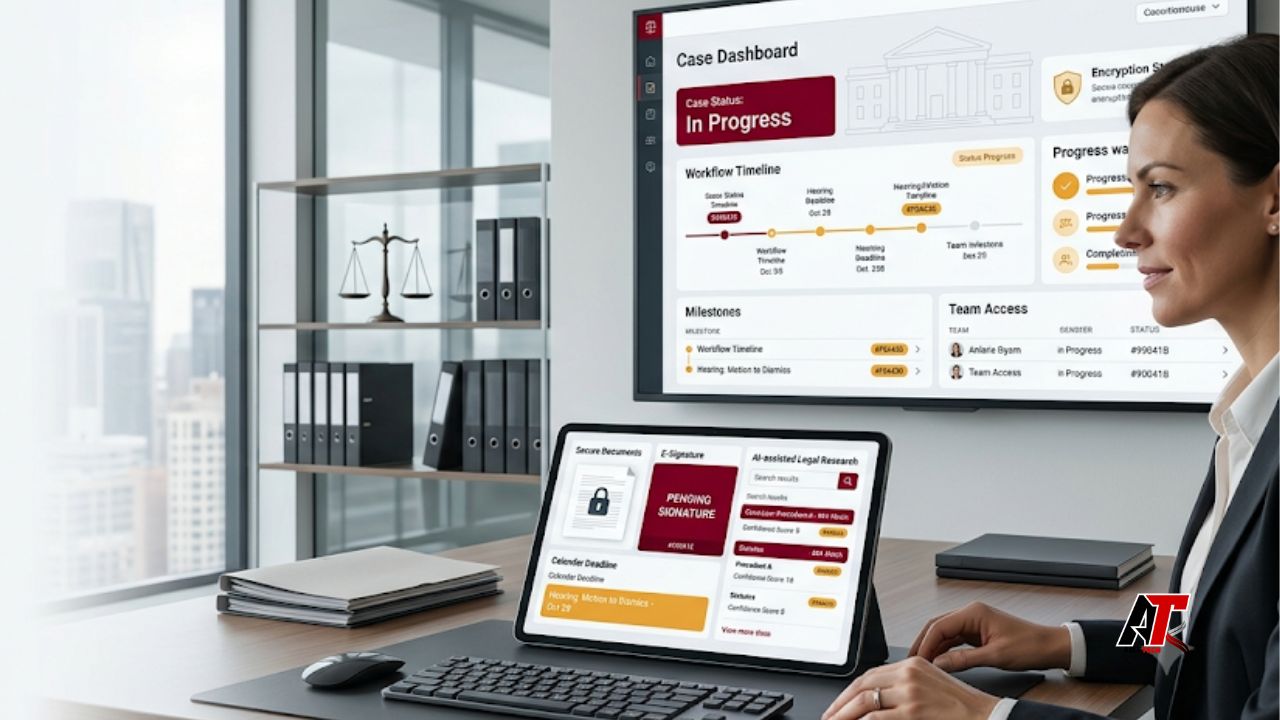
Legal work depends on precision, timing, and clear communication. Yet many everyday tasks still involve repeated data entry, long email chains, manual document checks, and scattered files. These habits slow teams down and create avoidable risk. Technology is changing that pattern by connecting routine work in one organized digital process.
Today, law firms and in-house teams use cloud platforms, automation, electronic filing, digital signatures, analytics, and artificial intelligence to handle work more efficiently. The goal is not to remove lawyers from legal decisions. Instead, technology supports the parts of legal work that benefit from speed, consistency, and easier access to information.
For readers following business and workplace technology trends, aelftech.com explains how digital tools can improve everyday operations without losing the human judgment that complex work requires. In legal practice, that balance matters because convenience must always sit alongside confidentiality, accuracy, professional responsibility, and client trust.
What Does a Modern Legal Workflow Look Like?
A legal workflow is the path a task follows from start to finish. For example, a new matter may begin with a client inquiry. The firm then completes a conflict check, collects documents, creates a file, assigns work, records deadlines, communicates with the client, prepares documents, tracks time, and sends an invoice.
In a manual setup, each step may happen in a separate spreadsheet, inbox, folder, or calendar. Staff members must remember where information is stored and who needs the next update. A modern workflow links these actions. When one step is completed, the next task can be assigned automatically, the correct people can be notified, and the matter record can stay up to date.
1. Digital Client Intake Reduces Repetitive Work
Client intake is one of the first areas where technology creates a visible improvement. Online forms can collect contact details, matter information, preferred communication methods, and supporting documents before the first meeting. This saves staff from copying handwritten notes or retyping information from emails.
A digital intake process can also guide potential clients through required questions. Conditional forms show different fields based on the answers provided. As a result, the firm receives more relevant information and can prepare for the consultation sooner.
The strongest systems connect intake with conflict checking, appointment scheduling, document requests, and matter creation. However, automation should not make the experience feel cold. Clients still need clear instructions, accessible forms, and an easy way to reach a real person when their situation does not fit a standard path.
2. Centralized Case Management Improves Visibility
Case management platforms bring matter details, contacts, notes, documents, calendars, billing records, and communications into one workspace. Instead of searching several tools, authorized team members can review the current status of a file from a central dashboard.
This is why well-integrated legal software can be more valuable than a collection of disconnected apps. A central system can reduce duplicate entries and help prevent information from becoming outdated in one location while remaining current in another.
Better visibility also supports teamwork. A lawyer can see which tasks a paralegal has completed. Billing staff can check whether time entries are missing. Managers can review capacity before assigning new work. Clients may also receive secure portal access, which reduces routine status emails and keeps sensitive exchanges away from ordinary inboxes.
3. Document Automation Speeds Up Drafting
Legal teams often produce documents that follow a known structure. Engagement letters, standard motions, notices, contracts, discovery requests, and closing documents may contain repeated language with matter-specific details. Document automation uses approved templates and data fields to create a first draft quickly.
The value is not limited to speed. Templates improve consistency because the same approved wording, formatting, and clauses can be used across similar matters. They also reduce the chance of leaving an old client name, date, address, or case number in a copied document.
Still, an automated draft is a starting point. A lawyer must review the facts, legal position, jurisdiction, tone, and final language. Teams should also control template ownership so outdated provisions are replaced and only approved versions remain available.
4. Cloud Collaboration Makes Legal Work More Flexible
Cloud tools allow authorized users to reach files and matter information from approved devices and locations. This supports hybrid work, multi-office firms, court travel, and collaboration with clients or outside counsel. It also reduces the need to send multiple document copies by email.
Modern collaboration features include version histories, comments, permission controls, task assignments, and real-time editing. These functions help teams identify the latest draft and understand who changed it. That is important when several people work on the same agreement, brief, or due diligence set.
Convenience alone is not enough. Firms must evaluate encryption, access controls, backup practices, data location, vendor terms, incident response, and account security. Multi-factor authentication and role-based permissions should be standard parts of the workflow, not optional extras.
5. E-Filing and Digital Signatures Shorten Turnaround Times
Electronic filing has changed the way many court documents are submitted. Lawyers can prepare files in the required format, complete filing details, and send documents through an online system. This reduces physical delivery and makes confirmation easier to track. It also means teams must pay close attention to technical rules, privacy requirements, redaction, file size, and court-specific procedures.
Digital signatures have created similar gains for agreements, authorizations, and engagement documents. Signers can review and complete documents from different locations. Automated reminders can follow up when a signature is still pending, while an audit trail records key actions.
These tools shorten routine turnaround times, but teams should confirm whether the signature method is suitable for the document, transaction, and jurisdiction. A fast process is useful only when it is also valid and properly recorded.
6. AI Supports Research, Review, and First Drafts
Artificial intelligence is becoming part of daily legal work. It can help summarize long documents, identify themes, compare clauses, classify records, generate questions, organize timelines, and produce an early draft. In large matters, AI-assisted review can help teams narrow a large document set so people can focus on the most relevant material.
Purpose-built AI legal assistance may also help lawyers explore issues, structure an argument, or prepare a first version of routine content. However, AI output can be incomplete, inaccurate, outdated, or presented with more confidence than the evidence supports. It may also miss facts that change the legal analysis.
For that reason, lawyers must verify citations, authorities, quotations, dates, calculations, and factual claims. They must also understand how a tool handles confidential information. Human review is not a final formality. It is the step that turns machine-generated material into responsible legal work.
7. Time Tracking and Billing Become More Accurate
Manual time entry is easy to postpone. When lawyers reconstruct a day from memory, small tasks may be missed and descriptions may lack detail. Modern platforms can use timers, calendar activity, communication records, and task history to help users create time entries closer to when the work occurs.
Better time capture supports more accurate invoices and clearer client communication. Billing rules can flag missing information, prohibited wording, unusual rates, or entries that need review. Electronic invoices and online payment options can also shorten the billing cycle.
Technology should not encourage careless billing. Every entry still needs to reflect real work, reasonable time, and the agreed fee arrangement. The best system makes accurate recording easier while keeping professional review in place.
8. Calendaring and Deadline Automation Reduce Risk
Legal deadlines can depend on filing dates, service dates, hearing schedules, court rules, contract terms, and jurisdiction-specific calculations. A missed date can harm a client and create serious consequences for a firm. Digital calendaring tools help teams record deadlines, assign responsibility, and send reminders at several stages.
Workflow rules can also create linked tasks. For example, entering a hearing date may trigger preparation deadlines, internal review dates, client reminders, and document checklists. Shared calendars improve visibility so absences or workload changes do not leave a critical date with one person only.
Even so, deadline automation requires careful setup and verification. Rules change, exceptions apply, and source information may be wrong. Firms should define who enters dates, who checks them, and how updates are confirmed.
9. Cybersecurity Becomes Part of Every Workflow
Legal teams hold sensitive personal, financial, commercial, and litigation information. As workflows become more digital, security can no longer sit only with the IT department. It must be built into intake, document sharing, remote access, vendor selection, offboarding, and daily communication.
Practical controls include multi-factor authentication, strong access policies, device management, encrypted storage, secure client portals, tested backups, staff training, and clear incident procedures. Firms should also remove access quickly when a person changes roles or leaves the organization.
Human behavior remains a major factor. A convincing phishing email or fake filing notice can bypass good technology when a user acts too quickly. Regular training and simple verification steps help staff pause before opening links, sharing credentials, or sending sensitive files.
The Main Benefits of Technology in Legal Workflows
When technology is selected and implemented well, legal teams gain more than isolated time savings. They create a more reliable operating system for the practice. Information becomes easier to find. Routine steps become consistent. Clients receive faster updates. Staff can spend less time on administrative repetition and more time on legal analysis, strategy, and service.
The main benefits include faster task completion, improved consistency, stronger visibility, better collaboration, easier remote access, more accurate billing, and clearer reporting. Technology can also support business continuity because files and procedures are less dependent on one person’s memory or one physical location.
These gains are not automatic. A tool that does not fit the firm’s work can add complexity. Success depends on thoughtful selection, secure configuration, clean data, staff training, and regular review.
Common Challenges Firms Must Manage
Technology projects often fail because teams focus on features before understanding the workflow. Buying a powerful platform will not fix unclear responsibilities, duplicate processes, or poor data. Firms should map the current process first and identify where delays, errors, and repeated work actually occur.
Adoption is another challenge. People may resist a new system when it adds clicks or when training is too general. Leaders should involve the people who perform the work, test the process with a small group, and provide role-based guidance. Feedback should lead to practical adjustments.
How to Modernize a Legal Workflow Step by Step
Start with one high-volume process, such as client intake, engagement letters, document review, invoice approval, or closing checklists. Write down every step, who performs it, what information is required, and where delays occur.
Next, decide which parts need human judgment and which parts are predictable enough to automate. Choose tools based on security, usability, integration, support, and the firm’s actual requirements. Do not select a system only because it has the longest feature list.
Then run a controlled pilot. Measure time saved, errors, user satisfaction, client response, and completion rates. Update the workflow before expanding it. Finally, assign an owner who will maintain templates, permissions, training, and process documentation as the practice changes.
Conclusion
However, legal work still depends on professional judgment. Lawyers must protect confidential information, verify output, follow court and ethics rules, and communicate clearly with clients. The most effective workflow is not the one with the most automation. It is the one that uses technology where it adds value while keeping people responsible for legal decisions.
Firms that modernize carefully can improve both productivity and service. By starting with real workflow problems, selecting secure tools, and training people well, they can build a practice that is more responsive, consistent, and prepared for future change.
Frequently Asked Questions
How is technology used in everyday legal work?
Legal teams use technology for client intake, conflict checks, document creation, research, case management, e-filing, digital signatures, calendaring, billing, secure communication, and reporting.
Will AI replace lawyers?
AI can support research, review, organization, and first drafts, but it cannot replace a lawyer’s professional judgment, ethical duties, client communication, or responsibility for final work.
What is the biggest benefit of legal workflow automation?
The biggest benefit is consistency. Automation helps routine steps happen in the correct order, reduces repeated data entry, and makes progress easier to track.
What should a law firm check before choosing new technology?
A firm should review security, privacy, usability, integrations, data ownership, vendor support, backup practices, pricing, and whether the tool fits its real workflow.
Why is human review still necessary when using legal AI?
AI may produce errors, invented authorities, missing context, or unsuitable language. A qualified person must verify facts, citations, confidentiality, and legal accuracy before using the output.
Leave a Reply