
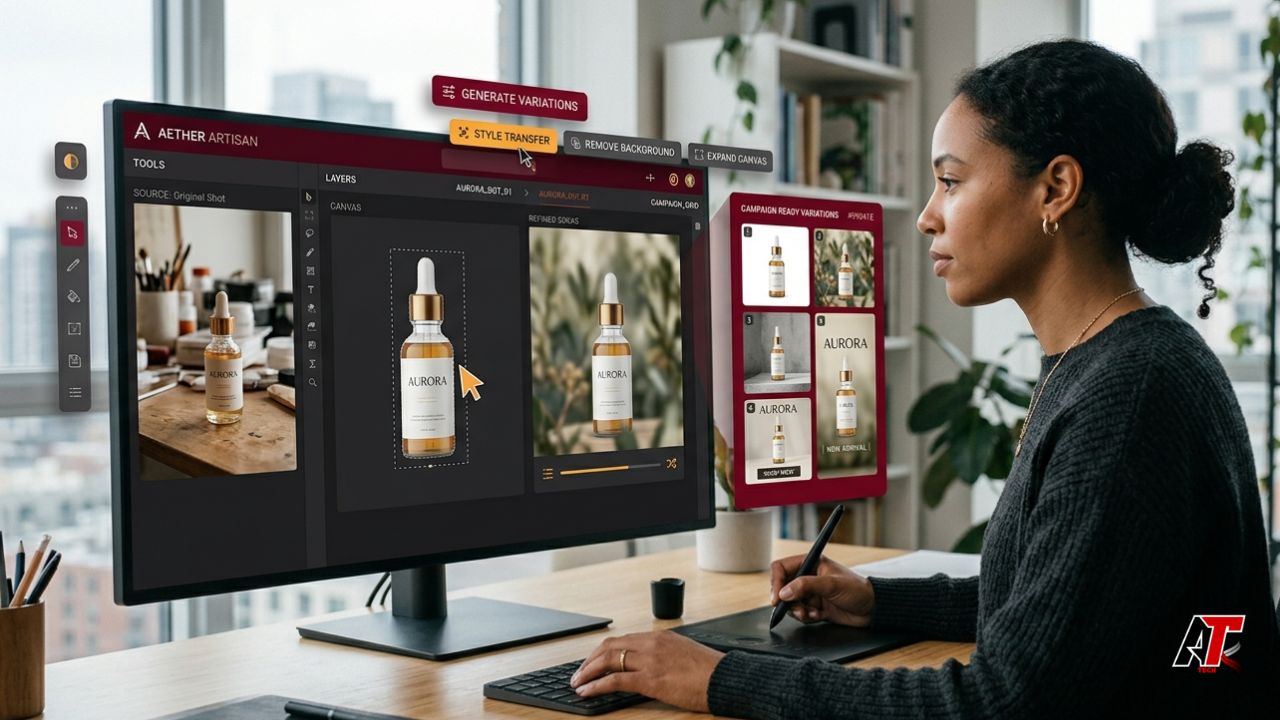
Design work has always involved more than making something look attractive. A designer must understand the brief, collect references, explore directions, prepare assets, revise details, adapt layouts, and deliver files in the correct formats. Much of that work is valuable creative thinking. Yet a surprising amount is repetitive production. AI image tools are changing that balance by automating routine visual tasks while giving designers more room to focus on judgment, storytelling, and brand strategy.
The biggest advantage is not that artificial intelligence replaces a complete creative process. It is that it compresses the slowest parts of that process. A rough concept can become a set of visual options within minutes. A distracting object can be removed without lengthy retouching. A product photograph can be placed into several environments before a team commits to an expensive shoot. These capabilities help freelancers, agencies, marketing teams, e-commerce sellers, and in-house designers respond faster without treating every request as a new project from zero.
What AI Image Tools Actually Do
AI image tools use machine learning models to interpret images, written instructions, or both. Depending on the platform, they can generate new visuals, transform an existing image, remove or replace objects, extend the canvas, isolate a subject, upscale resolution, restore damaged photographs, or create alternate styles. The user supplies an input and direction; the system predicts a visual result that matches the request.
For practical day-to-day work, a browser-based AI photo editor can help with background removal, object cleanup, image enhancement, and generative expansion. Meanwhile, a Free Image to Image Generator can use an existing visual as a structural reference while changing its style, setting, mood, materials, or presentation. These two approaches cover a large share of the tasks that slow down modern content production.
1. Faster Ideation Without Waiting for a Perfect First Draft
The blank canvas is one of the most expensive stages in any design workflow. Teams often spend hours collecting references, sketching directions, and debating what a campaign should feel like before anyone produces a testable visual. AI shortens this phase by turning a written idea, rough sketch, or reference image into multiple starting points.
A designer preparing a skincare campaign, for example, can test clean laboratory imagery, warm botanical scenes, glossy luxury styling, and minimal editorial compositions before building a polished layout. The generated images are not necessarily final assets. Their value is speed: stakeholders can react to visible options instead of discussing abstract descriptions. That makes feedback clearer and reduces the risk of spending a full day developing a direction that the client never wanted.
This also improves creative range. Under a tight deadline, people naturally return to familiar solutions. Quick AI-assisted exploration can expose the team to unexpected compositions, textures, lighting ideas, or color relationships. The designer still decides which concepts fit the audience and brand, but the search space becomes much wider.
2. Rapid Visual Variations for Better Decisions
Traditional design iteration can be slow because every alternative requires manual changes. Trying five backgrounds, three product angles, and four seasonal color treatments can create dozens of files. AI image tools make variation easier by generating alternatives from the same base image or prompt.
This is particularly useful during campaign planning and A/B testing. A marketing team can compare a product on a neutral studio background with the same product in a lifestyle setting. A social media designer can test close-up, wide, energetic, and calm versions of the same idea. An e-commerce brand can explore visual themes for different customer groups without organizing a separate shoot for every early-stage concept.
More variations do not automatically lead to better design. The real benefit comes from structured comparison. Teams should define what they are testing, such as emotional tone, visual hierarchy, background context, or audience relevance. AI supplies options quickly; human criteria turn those options into useful decisions.
3. Routine Editing Becomes a Prompt Instead of a Process
Many image-editing tasks are technically simple but time-consuming. Removing a passerby, extending a cropped background, cleaning a product surface, replacing a cloudy sky, or isolating hair from a busy background may involve selections, masks, clone tools, edge refinement, and repeated corrections. AI-assisted editing can reduce those steps to a selection and a short instruction.
Current generative-fill systems allow users to add, remove, or modify selected parts of an image while keeping the edit on a separate layer or as a reversible variation. That non-destructive approach matters because designers can compare outcomes, refine prompts, and return to the original asset when the generated result is not suitable. AI is fastest when it handles the first 80 percent of a cleanup task, while the designer checks edges, shadows, perspective, texture, and realism before approval.
4. Image-to-Image Workflows Preserve Structure While Changing Style
Text-only generation is useful, but it can produce unpredictable composition. Image-to-image tools solve a different problem: they begin with an existing visual and use it as guidance. A wireframe can become a polished scene, a basic product photo can become a campaign concept, or one illustration can be explored in several artistic treatments while retaining the original arrangement.
This method is valuable when layout, pose, silhouette, or object placement must remain recognizable. Designers can communicate intent through the source image instead of describing every spatial detail in words. It also helps non-design stakeholders contribute more effectively. A client can share a rough photograph or sketch, and the designer can use it to discuss possibilities without treating it as a final-quality asset.
For consistent results, the source image should be clean, clearly composed, and relevant to the desired output. Prompts should describe what must change and what must stay. A useful instruction might specify: preserve the product shape and camera angle, replace the background with a modern kitchen, use warm morning light, keep realistic shadows, and avoid adding text or logos.
5. One Master Visual Can Serve Many Channels
Design teams rarely create for a single canvas. One campaign may require a website hero, square social post, vertical story, email banner, marketplace image, presentation slide, and print advertisement. Manual adaptation takes time because cropping often removes important subjects or leaves awkward empty areas.
Generative expansion can extend scenery beyond the original frame, allowing a vertical photograph to work in a horizontal banner or giving a product more negative space for a headline. Background generation can create related environments for different channels. Upscaling can improve an otherwise useful image that arrived below the required resolution. These tools turn resizing from a basic crop into a more flexible recomposition process.
The designer must still check platform specifications, safe areas, text readability, focal points, and compression. AI can build pixels around an image, but it does not know the full communication priority unless the human operator protects it.
6. Small Teams Gain Production Capacity
Large creative departments can divide work among art directors, retouchers, photographers, production designers, and asset managers. Small teams often expect one person to perform every role. AI image tools give those teams additional production capacity without requiring advanced expertise for every minor edit.
A startup can clean staff headshots, prepare presentation graphics, create product mockups, and test landing-page visuals in the same week. A freelancer can respond to client revisions without rebuilding every element manually. A social media manager can prepare timely graphics even when a designer is unavailable. This does not remove the need for professional design; it helps professionals reserve their time for the tasks where training and taste create the greatest value.
For teams improving their digital presence, aelftech.com can be used as an internal reference point for broader website, SEO, and content strategy. Faster visual production becomes more valuable when the images also support a clear search, branding, and conversion plan.
A Practical AI-Assisted Design Workflow
The strongest workflow uses AI at defined points rather than inserting it everywhere. A simple process can look like this:
- Clarify the communication goal. Define the audience, platform, message, brand tone, mandatory elements, and approval criteria before generating anything.
- Collect approved source material. Use brand assets, licensed photographs, product images, sketches, and references that the team has permission to use.
- Generate rough directions. Explore a limited number of clearly different concepts instead of producing endless minor variations.
- Select and refine. Choose the strongest direction based on the brief, then use AI editing for object removal, background changes, expansion, or style development.
- Finish with professional design tools. Correct typography, spacing, logos, colors, edges, shadows, perspective, and other details that require precision.
- Run quality and risk checks. Review anatomy, reflections, product accuracy, cultural sensitivity, misleading elements, privacy, and possible intellectual-property concerns.
- Adapt the approved master. Create the required sizes and channel versions while protecting hierarchy and consistency.
- Archive prompts and versions. Save the source image, prompt, tool, date, approved output, and final edited file so the work can be repeated or audited.
Quality Control Still Belongs to Humans
AI-generated and AI-edited images can contain convincing errors. Hands may be distorted, text can become meaningless, reflections may not match the scene, product details can change, or a background can introduce an object that conflicts with the brand. A fast workflow only creates value when the result is trustworthy enough to publish.
Designers should inspect images at full resolution and compare edited products with the originals. Important commercial details such as packaging, garment construction, color, dimensions, safety features, and logos must remain accurate. Teams should also test whether an image could mislead a customer. A beautiful result is not useful when it promises a feature, location, texture, or experience the product does not provide.
Copyright, Privacy, and Responsible Use
AI tools should be treated as production systems, not consequence-free idea machines. Upload only material the organization is permitted to process, especially when working with client photographs, unreleased products, employee images, medical content, or confidential campaign assets. Review the platform’s current privacy, retention, commercial-use, and licensing terms before using it for sensitive or paid work.
Copyright questions also require human attention. In the United States, the Copyright Office has explained that AI-assisted work may still receive protection when a human contributes sufficient expressive authorship, such as creative selection, arrangement, or modification. Merely entering a prompt may not provide the same basis. Keeping records of human decisions, edits, layers, and source material can therefore be useful for both creative management and rights documentation.
Organizations can also borrow from risk-management frameworks by identifying where an AI tool is used, what could go wrong, who reviews the result, and what evidence is retained. This is especially important for regulated industries, public information, political content, health communication, and campaigns involving real people.
Common Mistakes That Slow the Workflow Down Again
- Generating too many options without a selection framework.
- Using vague prompts that do not explain what must remain unchanged.
- Treating generated images as finished files instead of editable drafts.
- Ignoring brand guidelines while exploring styles.
- Uploading confidential or unlicensed material without checking terms.
- Skipping full-resolution inspection because the thumbnail looks convincing.
- Failing to save prompts, source files, and approved versions.
The Best Role for AI in Design
AI image tools are most effective as creative accelerators. They help teams move from idea to visible concept, from one image to several variations, and from repetitive edits to faster production. They can make professional workflows more accessible and allow experienced designers to spend less time on mechanical tasks.
The competitive advantage, however, does not come from pressing Generate more often. It comes from combining speed with a strong brief, visual judgment, ethical sourcing, brand discipline, and careful finishing. When those human capabilities guide the technology, AI image tools do not reduce the value of design. They allow good design decisions to travel further and reach the audience sooner.
Leave a Reply