
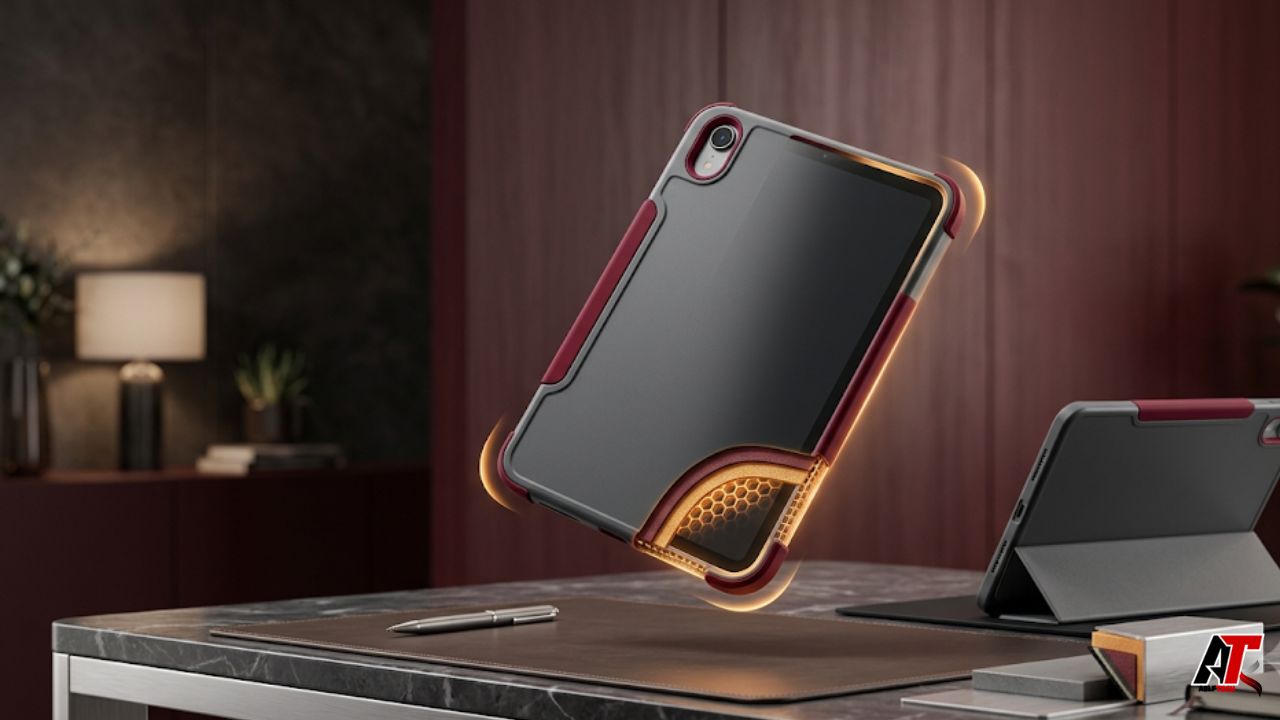
The iPad Mini is popular because it feels almost effortless to carry. Its compact shape works well for reading, note-taking, travel, fieldwork, entertainment, and quick creative tasks. That portability creates a natural question when choosing protection: can a lightweight case guard the tablet properly, or does real safety always require a thick, rugged shell?
The honest answer is that weight alone does not determine protection. A thin case can defend an iPad Mini against scratches, minor bumps, corner impacts, and many everyday drops when its structure is well designed. A heavy case can still perform poorly if it fits loosely, leaves the screen exposed, uses brittle materials, or lacks reinforced corners. The better approach is to examine how the case manages impact, grip, coverage, and daily use rather than judging it by bulk.
Why Lightweight Does Not Automatically Mean Fragile
Modern case design relies on geometry as much as material thickness. A slim shell can redirect force through reinforced edges, flexible corners, air pockets, and slightly raised lips. These details create space between the device and the surface during a fall. They may also help the case deform briefly, absorb part of the impact, and reduce the chance that the tablet frame or glass takes the full force.
This matters because the current iPad Mini itself is highly portable. Apple lists the Wi-Fi model at 293 grams, or 0.65 pound, with an 8.3-inch display. A case that adds excessive weight can undermine the reason many people choose the Mini in the first place. The goal is therefore not maximum material at any cost. It is efficient protection that preserves the device’s compact character.
What a Protective Case Actually Needs to Do
A useful case should address the most common sources of damage: sliding on a desk, rubbing against items in a bag, landing on a corner, striking an edge, or falling face-down. It should also protect the rear camera area and prevent the aluminum body from collecting dents and scratches. No normal consumer case can make a tablet indestructible, but thoughtful coverage can lower risk in ordinary situations.
Protection also includes prevention. A secure grip, balanced stand, and stable hand feel can stop a drop before it happens. Precise button openings and a correctly sized charging-port cutout prevent users from repeatedly removing the case. When the case remains comfortable and functional, the iPad is more likely to stay protected throughout the day instead of being used bare.
The Most Important Design Features
Start with the corners. Corners often receive concentrated force because they are small impact points and can transfer energy into the frame and display. Look for slightly thicker corner zones, flexible cushioning, internal air gaps, or a combination of firm outer support and softer inner material. The corner should fit closely without leaving the device able to shift inside the case.
Next, inspect the raised edges. A screen lip should keep the glass from touching a flat surface when the iPad is placed face-down, while a camera lip should prevent the lens surround from resting directly on a table. The lip does not need to be enormous, but it must remain higher than the exposed component after the iPad is installed. A folio cover can add another layer of screen protection during transport.
Materials Matter More Than Marketing Labels
Common case materials include thermoplastic polyurethane, silicone-like elastomers, polycarbonate, and composite structures. Flexible materials can absorb energy and improve grip, while rigid shells help resist bending and spread force across a larger area. Hybrid designs often combine these strengths. However, material names alone do not guarantee quality; thickness, formulation, shape, and connection points influence real performance.
Very soft cases may stretch over time or pull away from the corners. Extremely rigid cases can crack or transfer more force if they have little cushioning. Smooth finishes may look elegant but become slippery, especially when hands are dry or the tablet is used while walking. A protective lightweight design should feel secure, maintain its shape, and resist flexing away from the device during normal handling.
How to Evaluate a Specific Lightweight Case
Product pages should identify compatible iPad generations and model numbers, because cases that look similar may not align with the buttons, camera, speakers, magnetic charging area, or dimensions of another generation. A current lightweight case for iPad Mini collection, for example, is organized around the 8.3-inch iPad Mini and highlights slim portability and stand-based use. Treat such details as a starting point, then confirm the exact model printed in your iPad settings or on the device.
Check the case weight, edge height, material construction, corner treatment, pencil storage, stand mechanism, and return policy. Study photographs that show the installed device from the front, back, and sides. Be cautious when a listing uses broad terms such as military grade without explaining the test method, height, number of drops, surface type, device condition, or whether an independent laboratory was involved.
Drop Claims Need Context
A drop-protection claim is useful only when you understand what was tested. A case might survive repeated drops from a stated height onto plywood, concrete, steel, or another surface, but each condition produces a different result. Orientation also matters: a flat-back landing is generally different from a direct corner or screen-first impact. Real devices may already contain small frame distortions or weakened glass that change the outcome.
Look for specific, reproducible details rather than dramatic language. Even then, treat testing as evidence of reduced risk, not a promise that damage is impossible. Tablet drops are unpredictable, and the contents of a bag can press against the screen even when the exterior case remains intact. For expensive equipment, a good case works best alongside careful handling, a padded bag compartment, and appropriate device coverage or insurance.
Folio, Open-Back, and Stand Cases
A folio case protects the screen during storage and may support automatic wake and sleep functions. It is a practical choice for commuters, students, and people who carry the iPad with notebooks, chargers, or keys. The tradeoff is added weight and a cover that can move around while reading. A well-made folio should close securely, fold predictably, and avoid pressing grit against the display.
An open-front shell feels lighter and provides instant access, but the screen remains exposed unless you add a separate protector or use a padded sleeve. Stand cases improve video viewing, typing, drawing, and calls, yet the hinge or ring must be stable. A stand that collapses unexpectedly can send the tablet forward. The safest choice is the format that supports how you genuinely use and transport the device.
Protection Should Not Reduce Usability
A case can be physically strong and still be a poor everyday choice if it blocks the speakers, interferes with Touch ID, makes the volume buttons difficult to press, or disrupts Apple Pencil attachment and charging. Tight openings can also strain charging cables. Test every function immediately after installation and confirm that the device sits flat without twisting or lifting at a corner.
Heat management matters too. Normal cases do not actively cool the iPad, but an excessively enclosed or poorly fitted design may make heat feel more noticeable during demanding tasks or charging. Avoid leaving the tablet in direct sun or a hot vehicle, and remove debris trapped between the case and device. Fine grit can scratch the finish even when the exterior looks protective.
Your Daily Risk Profile Determines the Right Level
A lightweight case is often sufficient for an adult who uses the iPad at home, in an office, on flights, or during a calm commute. It offers a sensible balance when the main risks are desk scratches, bag contact, short falls, and occasional bumps. Users who walk between job sites, share the tablet with children, work around tools, or use it in busy classrooms may need thicker corners, a hand strap, port covers, or a more rugged enclosure.
Think about where a drop would happen and what the iPad would hit. Carpeted rooms present a different risk from concrete stairs. A tablet stored in a dedicated sleeve faces less pressure than one tossed into a crowded backpack. For broader guidance on choosing a portable tablet setup for daily travel, see aelftech.com. Matching the case to the real environment is more useful than buying solely by appearance.
A Practical Buying Checklist
Before purchasing, verify the iPad generation and model number; compare the listed case weight; inspect corner reinforcement; confirm raised screen and camera edges; review the grip texture; check button and port access; and decide whether you need a folio, pencil holder, stand, hand strap, or detachable cover. Read a mix of positive and critical reviews, especially comments written after several months of use.
Also verify the seller and web address. Brand names can appear across unrelated businesses, so the domain should match the product category and listing you intend to buy. The supplied link for TORRAS, for instance, should be checked carefully against the device-accessory storefront before publication or purchase. This simple verification reduces the risk of confusing two different companies that share a name.
How to Keep a Lightweight Case Protective
Protection declines when a case becomes stretched, cracked, loose, or contaminated. Remove it periodically and wipe both the case and iPad with methods recommended for the materials. Clear away sand, crumbs, and hard particles. Inspect the corners, stand hinge, magnetic cover, pencil holder, and raised lips. Replace the case if the device begins moving inside it or if impact areas no longer return to shape.
Do not repeatedly test protection by dropping the tablet. A case can absorb energy while developing hidden stress, and the iPad may suffer internal damage without immediate symptoms. After a serious fall, check the screen, cameras, buttons, frame, charging, wireless connections, and battery behavior. When in doubt, have the device examined rather than assuming an undamaged exterior means everything inside is fine.
Frequently Asked Questions
Can a thin iPad Mini case protect against drops?
Yes, a well-designed thin case can reduce damage from many routine drops, especially when it has reinforced corners, a close fit, raised edges, and a grippy finish. It cannot guarantee survival in every fall, and protection depends on height, angle, surface, and the condition of the device.
Do I still need a screen protector with a case?
A screen protector can add scratch resistance and may help with minor direct impacts, while the case protects the frame, corners, and back. It is particularly useful with an open-front shell. A folio offers transport coverage, but grit trapped inside the cover can still mark the display.
Is a heavier case always safer?
No. Extra weight may come from covers, stands, or decorative materials rather than better impact management. Compare corner design, edge coverage, fit, materials, grip, and documented testing instead of assuming that the heaviest option offers the strongest protection.
When should I replace my iPad Mini case?
Replace it when corners loosen, the shell cracks, the folio no longer closes securely, the stand becomes unstable, buttons stop aligning, or raised edges wear below the screen or camera. Replacement is also sensible after a severe impact that visibly deforms the case.
Conclusion
A lightweight iPad Mini case can be genuinely protective when the design uses its limited material intelligently. Secure corners, raised edges, a precise fit, reliable grip, suitable materials, and stable accessories matter far more than a bulky appearance. The ideal case should lower the chance of damage without making the compact tablet uncomfortable to hold or inconvenient to carry. Choose according to your daily risks, verify any testing claims, check model compatibility, and replace the case when wear compromises its fit. That balanced approach preserves both portability and practical protection.
Leave a Reply