
Introduction
Many Singapore SMEs rely on WhatsApp every day, but the way messages are handled often becomes messy as the business grows. Enquiries arrive through personal phones, replies depend on who is available, and promising leads can go cold before anyone follows up.
This is where the WhatsApp Business API becomes useful.
Unlike the standard WhatsApp Business app, the API is designed for teams that need structure, automation, shared access, and proper customer records. It allows businesses to manage conversations more professionally while still communicating through the app customers already use.
For Singapore businesses, this matters because WhatsApp is often the default channel for enquiries, bookings, delivery updates, payment reminders, and customer support. When handled well, it can become more than a messaging tool. It can support sales, service, retention, and customer experience.
This guide explains how WhatsApp API works, how SMEs use it, what to prepare before setup, and where a partner such as Advergreen Digital can help make implementation easier.
Key Takeaways
- The WhatsApp Business app suits solo operators, while the API suits growing teams. The API allows multiple staff to manage conversations through one business number.
- Automation helps prevent missed leads. Chat flows, instant replies, reminders, and routing rules can keep customers engaged even when staff are busy.
- WhatsApp API can connect with business systems. It can integrate with customer records, booking tools, online stores, and payment workflows.
- Compliance matters in Singapore. Businesses should collect consent properly, respect opt-outs, and manage customer data carefully under PDPA requirements.
- Start simple before adding complex automation. The best first use cases are usually lead follow-up, appointment reminders, cart recovery, and customer support.
- A local implementation partner can reduce technical friction. Advergreen Digital can support SMEs that need help with setup, workflow planning, and practical rollout.
What Is WhatsApp API?
WhatsApp API, more formally known as the WhatsApp Business Platform, allows businesses to use WhatsApp at scale.
It is different from the free WhatsApp Business app. The app is useful for small owner-operated businesses, but it becomes limited when several team members need to manage conversations, track leads, or connect WhatsApp with other systems.
The API allows businesses to:
- Use one official business number across a team
- Manage chats through a shared inbox
- Automate common replies
- Send approved message templates
- Connect WhatsApp to customer databases
- Route enquiries to the right staff
- Track conversations more clearly
- Support reminders, updates, and follow-ups
In simple terms, the WhatsApp Business app helps you chat. The WhatsApp API helps your business operate.
Why the WhatsApp Business App Becomes Limiting
Many SMEs start with the free WhatsApp Business app because it is easy to use. For early-stage businesses, that may be enough.
However, problems appear as message volume increases.
Common issues include:
- Only one or a few people can manage the account effectively
- Conversations are spread across different phones
- Staff may not know whether a lead has been followed up
- Customer history is difficult to track
- Broadcasts and updates are limited
- Manual replies take too much time
- No-shows and missed payments require repeated chasing
- Reporting is weak or unavailable
These issues may seem small at first, but they can affect revenue. A delayed reply can cost a sale. A missed reminder can lead to an empty appointment availability. A customer who receives unclear information may choose another provider.
The API helps solve these problems by turning WhatsApp into a structured communication channel.
How Singapore SMEs Use WhatsApp API
WhatsApp API is useful across many industries because almost every business needs faster, clearer customer communication.
1. Instant Lead Follow-Up
Speed matters when someone submits an enquiry.
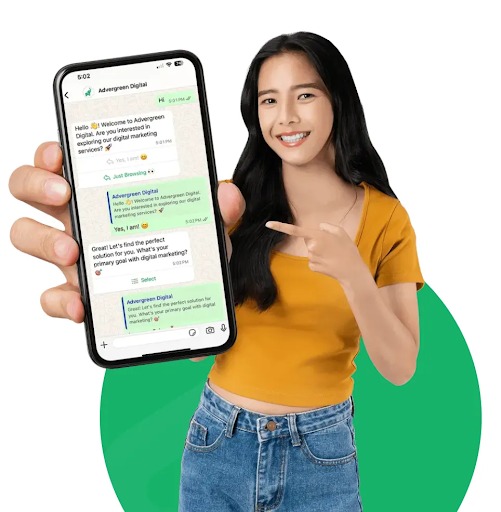
With WhatsApp API, a business can automatically send a first response when a lead comes in. The message can confirm interest, ask qualifying questions, and route the customer to the right staff member.
For example, a renovation firm can ask about property type, timeline, and budget. A clinic can ask what service the customer is interested in. A tuition centre can ask about the child’s level and subject.
This helps staff respond with context instead of starting from zero.
2. Appointment Reminders
Clinics, salons, gyms, tuition centres, consultants, and service providers often lose revenue through missed appointments.
WhatsApp API can send automated reminders before the appointment. Customers can confirm, reschedule, or ask questions directly in the chat.
This reduces manual admin work and helps businesses protect booked availability.
3. Cart Recovery and Payment Follow-Up
For e-commerce and retail businesses, customers may add items to cart but leave before completing payment.
WhatsApp API can send a reminder with product details, support options, or a direct payment link. Because WhatsApp feels conversational, the reminder can feel more helpful than a generic email.
This is especially useful when customers need reassurance before buying.
4. Order and Delivery Updates
Customers appreciate clear updates after making a purchase.
Businesses can use WhatsApp API to send:
- Order confirmations
- Payment confirmations
- Delivery updates
- Collection reminders
- Product care instructions
- Warranty or support information
These updates reduce uncertainty and lower the number of repetitive customer service questions.
5. Customer Support Automation
Many customer questions are repetitive.
For example:
- What are your opening hours?
- Where are you located?
- How much does this cost?
- Do you have any availability?
- How do I make payment?
- Can I reschedule?
- What documents do I need?
A chatbot can answer simple questions immediately, while more complex cases can be routed to a staff member.
This helps the business stay responsive without hiring more people for every increase in message volume.
6. Event and Class Reminders
Event organisers, training providers, schools, and enrichment centres can use WhatsApp API to manage communication before and after sessions.
Useful messages include:
- Registration confirmations
- Venue details
- Reminder messages
- Last-minute updates
- Attendance confirmations
- Feedback requests
- Follow-up materials
This keeps participants informed and reduces confusion.
What Makes WhatsApp API Useful in Singapore?
Singapore customers are used to fast, direct communication. Many prefer messaging over calling, especially when asking about prices, bookings, availability, or service details.
WhatsApp fits this behaviour naturally.
For SMEs, the API adds structure to a channel customers already trust. It allows businesses to stay personal while operating more efficiently.
The main advantages are:
- Faster response times
- Fewer missed enquiries
- Better team coordination
- More consistent customer experience
- Easier follow-up
- Better tracking of conversations
- Less manual admin work
- More reliable reminders and updates
This is especially useful for SMEs that do not have large sales or support teams.
What to Prepare Before Setting Up WhatsApp API
Before adopting WhatsApp API, businesses should prepare the basics. A rushed setup can create confusion later.
1. Define the Main Use Case
Start with one or two clear goals.
For example:
- Faster lead follow-up
- Appointment reminders
- Cart recovery
- Customer support
- Payment reminders
- Event updates
- Post-purchase service
Trying to automate everything at once can make the rollout harder. Start where the business loses the most time or revenue.
2. Prepare Customer Consent
Businesses should be careful about consent. Customers should understand that they may receive WhatsApp messages from the company.
Good consent practices include:
- Clear opt-in language on forms
- Easy unsubscribe options
- Respecting customer preferences
- Avoiding irrelevant mass messages
- Keeping records of consent where appropriate
This is especially important under Singapore’s PDPA expectations.
3. Plan Message Templates
Some outbound WhatsApp messages require approved templates. These are commonly used for reminders, updates, confirmations, and follow-ups.
Templates should be clear, useful, and not overly promotional.
Examples include:
- Appointment confirmation
- Payment reminder
- Order update
- Delivery notice
- Booking reminder
- Event instruction
- Follow-up after enquiry
Good templates reduce confusion and improve response quality.
4. Decide Who Handles Replies
Automation should not replace human service completely.
The business should decide:
- Who handles new enquiries?
- Who takes over complex questions?
- What happens after office hours?
- How quickly should staff respond?
- Which conversations should be escalated?
- How are sales opportunities tracked?
A clear workflow helps prevent leads from being lost.
5. Connect the Right Systems
Depending on the business, WhatsApp API may connect with:
- A shared team inbox
- A CRM
- An e-commerce platform
- A booking system
- A payment tool
- A customer support platform
- A spreadsheet or reporting dashboard
The goal is not to connect every possible tool. The goal is to make customer communication easier to manage.
Common Mistakes to Avoid
Mistake 1: Automating Too Much Too Soon
Too much automation can frustrate customers if it feels rigid. Start with simple, useful flows and improve over time.
Mistake 2: Sending Too Many Messages
WhatsApp is personal. Businesses should avoid treating it like a spam channel. Send messages that are timely, relevant, and useful.
Mistake 3: Ignoring PDPA Requirements
Consent, data handling, and opt-out processes matter. Businesses should treat WhatsApp conversations as customer data, not casual chat.
Mistake 4: Using Generic Message Templates
Messages should sound clear and human. Overly robotic templates can reduce trust.
Mistake 5: Not Training Staff
Even with automation, staff need to know how to use the system, reply properly, and follow the agreed workflow.
Where Advergreen Digital Fits In
For many SMEs, the challenge is not understanding why WhatsApp API is useful. The challenge is setting it up properly and making it work with daily operations.
Advergreen Digital can support Singapore businesses with WhatsApp API planning and implementation. This may include account setup guidance, workflow planning, chatbot setup, message template preparation, integration support, and team training.
The practical value is helping SMEs move from scattered WhatsApp conversations to a more organised system. Instead of relying on personal phones and manual tracking, businesses can manage enquiries, reminders, and follow-ups more consistently.
For companies already receiving enquiries through WhatsApp, this structure can make a noticeable difference in how quickly leads are handled and how smoothly customers are served.
The Bottom Line
WhatsApp is already one of the most important customer communication channels for Singapore SMEs. The WhatsApp Business API helps growing businesses manage that channel with more structure, speed, and consistency.
It is especially useful for businesses that deal with enquiries, appointments, online orders, consultations, events, or repeat customer communication.
The best approach is to start with practical use cases:
- Instant lead replies
- Appointment reminders
- Cart recovery
- Payment follow-up
- Customer support
- Order updates
- Event reminders
From there, businesses can add more advanced automation once the basics are working well.
WhatsApp API is not just a technical upgrade. It is a way to protect leads, improve service, and create a more reliable customer journey.
Frequently Asked Questions
Is WhatsApp API legal for businesses in Singapore?
Yes, WhatsApp API in Singapore can use WhatsApp API. However, they should follow relevant data protection and consent practices, including clear opt-ins, proper data handling, and easy opt-out options.
How is WhatsApp API different from the WhatsApp Business app?
The WhatsApp Business app is suitable for very small businesses or solo operators. WhatsApp API is designed for growing teams that need shared access, automation, integrations, and better tracking.
How long does WhatsApp API setup take?
Setup time varies depending on account readiness, verification requirements, message templates, integrations, and workflow complexity. Simple setups may be completed relatively quickly, while more complex integrations take longer.
How much does WhatsApp API cost in Singapore?
Costs vary depending on message volume, conversation type, platform provider, chatbot needs, integrations, and support requirements. Businesses should estimate expected usage before choosing a setup.
Can small businesses afford WhatsApp API?
Yes, many small businesses can start with a simple setup focused on one or two high-value use cases. The key is to begin with workflows that save time or protect revenue, such as lead follow-up or appointment reminders.
Do I need a developer to use WhatsApp API?
Not always. Businesses working with an implementation partner may not need an internal developer. The level of technical support required depends on the setup, integrations, and automation complexity.
What are the best first automations to set up?
The best starting automations are usually instant enquiry replies, appointment reminders, cart recovery messages, payment reminders, and basic FAQ responses.
Can WhatsApp API connect with my CRM or online store?
Yes, WhatsApp API can often be connected with customer management systems, e-commerce platforms, booking tools, and payment workflows, depending on the setup and tools used.
When should an SME work with a WhatsApp API specialist?
An SME should consider specialist support when message volume is growing, staff are missing replies, customer data is scattered, or the business wants automation but lacks technical experience.
A team such as Advergreen Digital can help make the setup more structured and easier for staff to use.
READ ALSO: Understanding Indianapolis Wrongful Death Claims After a Sudden Family Loss
Leave a Reply