

Technology now weaves into nearly every moment of daily life, making your phone feel less like a gadget and more like a personal companion. When it reflects your habits, tastes, and emotional rhythms, it becomes something far more comfortable and intuitive to use. Many people, however, simply live with the default setup and never discover how much calmer and smoother their digital routines could be. Small customization choices often have a surprisingly big impact on how focused, relaxed, or inspired you feel when you pick up your device. In this article, you’ll learn practical, relatable ways to personalize your phone so it truly feels like an extension of you.
Express Yourself Visually: The Foundation of Personal Feel
Curate a Wallpaper
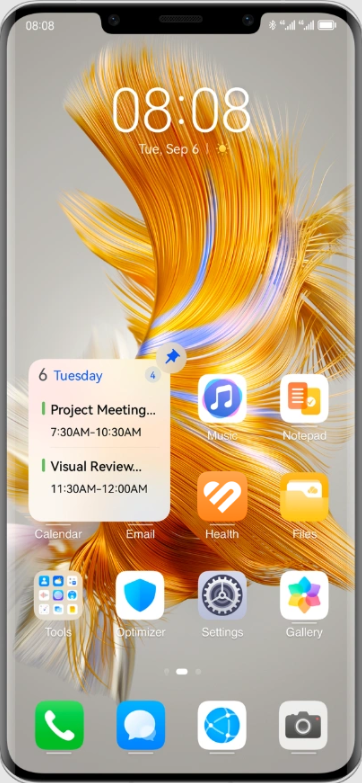
A thoughtfully chosen wallpaper is one of the simplest ways to set the tone for your entire mobile experience. Because it’s the first thing you see each time you unlock your device, it can quietly influence your mood. Many people underestimate how much a soothing landscape or a bright, energetic illustration can lift the mind during a stressful day. Even something as simple as a family photo or a favorite quote can help create a sense of familiarity and comfort. This small visual choice makes your phone feel emotionally aligned with your daily life.
Choose an Icon Pack and Color Theme
Altering your icons and system colors allows your phone to feel more cohesive and more reflective of your personality. Soft pastels, bold contrasts, or minimal neutral tones can each convey a different atmosphere—calm, playful, or focused. When your app icons match your wallpaper or overall aesthetic, your home screen becomes easier to navigate because visual harmony reduces mental distraction. A unified look helps your phone feel thoughtfully designed rather than crowded or random.

Organize for Your Brain, Not Just Your Apps
Design a Home Screen Layout
Your home screen should follow the way your mind naturally seeks things, not the way the phone initially presents them. If you’re wondering How to arrange apps in huawei to achieve this, start by identifying the few you use daily—placing them within easy reach to reduce unnecessary taps. Spacing elements mindfully can lower visual clutter and make navigation feel quicker. Some users prefer a mostly empty main screen for a calmer experience, while others place all essentials on one page. Ultimately, what matters is building a pattern that matches your instinctive workflow.
Create Folders and Widgets
Folders help group similar tasks, but their real value appears when they reflect your actual lifestyle rhythms rather than generic categories. A “Morning Start” folder, for example, may combine weather, calendar, and music, while a “Health & Calm” folder might keep meditation tools and step trackers together. Widgets also bring dynamic information to the surface, saving time by showing what you need without opening multiple apps. When arranged with intention, these elements reshape your screen into a personalized command center. They let your phone support your natural routines instead of forcing you to adapt to rigid structures.
Tune the Sounds and Haptics to Your Preferences
Customize Ringtones and Alerts
Giving specific tones to your closest people helps you immediately recognize priority messages without even looking at the screen. This small adjustment can reduce anxiety, because not all notifications demand the same level of attention. Personal ringtones also add warmth and familiarity to incoming calls, making communication feel more human and less mechanical. Many people find that just a few customized tones help them manage social interactions more gracefully. It’s a simple way to let your phone echo the rhythm of your relationships.
Adjust Haptic Feedback and System Sounds
Haptics contribute more to your experience than you might expect, subtly shaping how responsive and alive your device feels. A softer vibration pattern can make typing feel smoother, while a stronger one helps ensure you don’t miss important alerts. Sound cues, when chosen thoughtfully, can add personality to everyday tasks like locking the screen or sending a message. Over time, these sensory choices create a comforting sense of familiarity that makes your phone feel tailored rather than generic. This makes interactions more pleasant and intuitive throughout daily use.
Leverage Automation and Accessibility
Set Up Focus Modes and Routines
Automation allows your phone to adjust itself to your lifestyle instead of demanding constant manual changes. Morning routines can activate brighter tones and essential widgets, while evening routines dim brightness and silence unimportant alerts. Focus modes help filter out distractions so your attention stays where it belongs—at work, during family time, or when winding down at night. These tools reduce the mental load of managing constant digital inputs. They transform your phone from merely reactive to genuinely supportive.
Use Accessibility Settings
Accessibility features aren’t only for specific needs—they enhance convenience for anyone who wants a smoother experience. Adjustable text size makes reading easier without eye strain, while gesture shortcuts simplify multitasking across busy days. Visual enhancements can make icons and menus easier to distinguish, reducing mistakes when navigating quickly. Voice assistant shortcuts can save time when your hands are full or when you’re multitasking around the house. These settings turn your phone into a device that adapts to you, not the other way around.
Conclusion
True personalization isn’t about complexity—it’s about creating a space that feels comfortable, inspiring, and aligned with your everyday rhythms. With small, thoughtful adjustments, your phone becomes less chaotic and more supportive of the life you want to lead. Even choosing a device that prioritizes customization, such as a Huawei phone, can make the experience smoother and more enjoyable. When your screen, sounds, layout, and routines reflect your preferences, using your phone becomes both calmer and more intuitive. The result is a digital environment that feels unmistakably yours.
Leave a Reply