

Every day, businesses drown in paperwork disguised as data. Invoices arrive as PDFs. Contracts sit in email threads. Identity documents stack up as scans. Meanwhile, employees spend hours typing the same fields into spreadsheets and systems. This technology exists to end that cycle. It uses machine learning to read, understand, and process documents the way a trained human would, only faster, cheaper, and at unlimited scale.
The shift is no longer experimental. Industry estimates suggest around 80 percent of enterprise data remains unstructured, locked inside exactly the kind of files this technology handles. Yet many organizations still hesitate, unsure how these systems actually work or whether the accuracy justifies the investment.
This guide explains what Document AI really means under the marketing labels. Furthermore, it walks through the processing pipeline step by step and maps the use cases delivering measurable returns today. Furthermore, you will find a comparison of leading platforms and a practical checklist for choosing the right one for your operation.
Key Takeaways
- Document AI uses machine learning, computer vision, and natural language processing to convert unstructured documents into structured, usable data.
- According to Grand View Research, the intelligent document processing market was valued near $3 billion in 2025. Moreover, it is projected to grow at over 33 percent annually through 2033.
- Modern platforms go far beyond OCR: they classify layouts, extract entities, parse tables, and even understand context with generative AI.
- The strongest returns come from high-volume, rule-bound documents such as invoices, identity records, claims, and loan files.
What Is Document AI?
Document AI is a class of artificial intelligence technology designed to read, classify, extract, and validate information from documents automatically. To do this, it combines optical character recognition, machine learning, computer vision, and natural language processing. As a result, files such as invoices, forms, receipts, contracts, and ID cards become structured data that business systems can use immediately.
You will often see the term used interchangeably with intelligent document processing, or IDP. Strictly speaking, intelligent document processing describes the broader discipline. That label more often describes the technology layer powering it, although Google uses the same name for its own cloud product. In practice, all three phrases point at the same transformation: replacing manual document handling with trained models.
Notably, the category has evolved through three generations. First came template-based OCR, which could only read fixed layouts and broke whenever a form changed. Next, machine learning brought layout-aware extraction that generalized across formats. Now, generative and multimodal models enable near zero-shot extraction, where a modern system can pull requested fields from documents it has never seen before. Each generation expanded accuracy and shrank setup effort, which is why comparisons with tools from even a few years ago now feel outdated.
The commercial momentum reflects this maturity. Grand View Research valued the intelligent document processing market at roughly $3.0 billion in 2025. The firm projects growth to around $29.7 billion by 2033, a compound annual rate of 33.8 percent. Few enterprise software categories are expanding faster.
How Does Document AI Work?
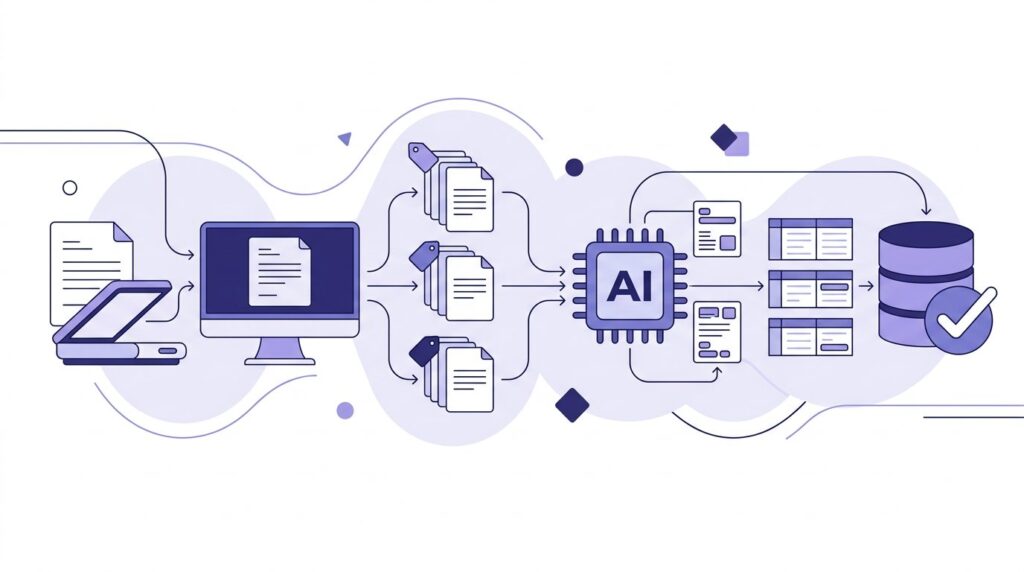
Although implementations differ by vendor, virtually every Document AI platform follows the same five-stage pipeline. Understanding it helps you evaluate products intelligently.
Stage one — ingestion and digitization. Documents enter the system as scans, photos, PDFs, or email attachments. Image preprocessing then cleans them up: deskewing rotations, reducing noise, enhancing contrast, and normalizing formats so downstream models receive readable input.
Stage two — classification. The system identifies what each document is: invoice versus purchase order, passport versus utility bill. Layout analysis and content signals drive this routing, which determines which extraction models apply next.
Stage three — extraction. Here the real intelligence happens. Models locate and capture entities such as vendor names, totals, dates, and line items, while table parsers reconstruct complex grids cell by cell. Modern systems read handwriting through intelligent character recognition and understand context — distinguishing, for example, between a billing address and a shipping address without rigid templates. Some platforms also stamp bounding-box coordinates on every extracted value, so reviewers can verify context with a single glance.
Stage four — validation and human-in-the-loop. Extracted values pass through business rules: totals must equal line sums, dates must be plausible, vendors must exist in your master data. Anything below a confidence threshold routes to a human reviewer, whose corrections feed back into model improvement.
Stage five — export and integration. Clean, validated data flows into ERPs, accounting platforms, CRMs, or databases through APIs and connectors, completing the journey from paper to system of record.
Key Capabilities of Modern Document AI Platforms
When comparing vendors, these capabilities separate genuinely useful Document AI platforms from rebranded OCR tools.
- Handwriting recognition — accurate reading of cursive and printed handwriting, essential for forms and checks
- Layout-agnostic extraction — field capture that works across unseen formats without per-template setup
- Table and line-item parsing — structural reconstruction of complex tables, not just flat key-value pairs
- Generative extraction — prompting models for custom fields in natural language, dramatically cutting configuration time
- Confidence scoring with review queues — granular routing so humans see exceptions, not everything
- Continuous learning — models that improve from every human correction rather than static snapshots
- Enterprise integrations — native connectors and robust APIs for your accounting, ERP, and workflow stack
- Compliance controls — encryption, region pinning, audit logs, and certifications aligned to your regulatory exposure
Any solution missing several items on this list will likely underdeliver once your document variety grows.
Document AI Use Cases Across Industries
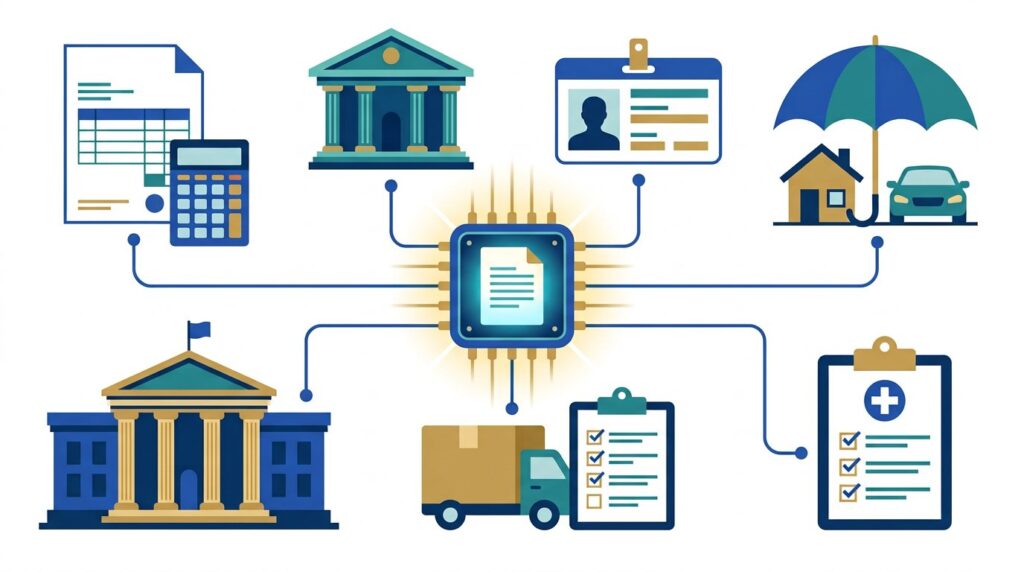
In practice, the technology proves itself fastest where volumes are high and documents follow predictable patterns. These sectors are capturing the largest gains today.
Accounts payable and finance lead the pack. Invoice capture automates vendor, amount, tax, and line-item extraction, then matches invoices against purchase orders and receipts. Teams routinely cut processing cycles from days to hours while improving early-payment discount capture.
Banking and KYC onboarding depends on identity verification. Extracting names, dates, and document numbers from passports, licenses, and proof-of-address files accelerates account opening while strengthening compliance checks.
Lending and mortgages involve some of the heaviest paperwork in any industry: pay stubs, bank statements, tax returns, and appraisals. Automated extraction shortens loan cycles meaningfully, and every day saved directly improves pull-through rates.
Insurance claims processing benefits twice — extractors read claim forms and supporting evidence, while classification routes each file to the correct workflow. In turn, faster and more consistent intake translates directly into customer satisfaction.
Healthcare administration uses these systems for patient intake forms, referrals, and claims attachments, reducing the clerical burden that has plagued providers for decades. Meanwhile, logistics and government agencies process bills of lading, customs declarations, permits, and citizen applications at scales where manual handling simply breaks.
The Business Benefits of Document AI
Across these use cases, the returns concentrate in four measurable areas.
Speed arrives first and most visibly. Automated pipelines process documents in seconds, compressing cycle times by 80 percent or more in typical deployments. Work that queued for days starts completing before lunch, and approval workflows that once waited on interoffice envelopes now close the same afternoon documents arrive.
Accuracy improves simultaneously. Machines do not tire at the thousandth invoice. Moreover, confidence-based review catches the exceptions they miss. Organizations typically report error rates falling substantially once validation rules and human review replace keystroke-by-keystroke retyping.
Cost per document drops as volume scales. Industry benchmarks often peg manual invoice processing at roughly ten to fifteen dollars per document. By contrast, mature automation brings that down to a small fraction. As a result, payback periods frequently land inside the first year.
Finally, people get better jobs. Staff previously consumed by data entry move into analysis, exception handling, and customer-facing work — the same redeployment pattern driving finance and operations transformation everywhere.
Leading Document AI Platforms Compared
The market splits into two camps: hyperscale cloud providers selling flexible building blocks, and specialist vendors selling faster time-to-value.
| Platform | Best For | Notable Strength |
|---|---|---|
| Google Cloud Document AI | Developers building custom pipelines | Pretrained and generative custom extractors, strong OCR foundation |
| Azure AI Document Intelligence | Microsoft-centric enterprises | Deep Office and Dynamics integration, mature prebuilt models |
| AWS Textract | AWS-native architectures | Queries feature for natural-language extraction, broad table support |
| ABBYY Vantage | Complex enterprise document estates | Decades of OCR heritage with low-code skill design |
| Hyperscience | Regulated, high-accuracy workflows | Strong handwriting recognition and human-in-the-loop design |
| Rossum | Accounts payable automation | Purpose-built AI for transactional documents and inboxes |
| Nanonets | SMBs and fast-moving teams | Quick setup, approachable pricing, broad template library |
Importantly, neither camp is universally better. Specifically, hyperscalers reward engineering investment with flexibility and per-page economics. Specialists, by contrast, deliver opinionated workflows that reach production in weeks. Many organizations pair both — a hyperscaler engine wrapped in a specialist’s user experience. Note too that vocabulary varies between vendors: processor, parser, skill, and flow often describe the same moving part, so normalize terminology during evaluations.
How to Choose the Right Document AI Solution
Selection mistakes usually stem from testing the wrong things. Follow this checklist and you will avoid the common traps.
First, profile your documents. Volumes, type diversity, handwriting share, and language mix determine which engine class fits. A vendor brilliant with typed English invoices may stumble on handwritten multilingual forms. Document a two-week sample period before vendor calls so your numbers come from reality rather than estimates.
Second, run a proof of concept on your own files. Vendor demos use flattering samples. Demand accuracy metrics — field-level precision and recall — measured against your real document set, including the messy edge cases.
Third, score the human review experience. Exception handling is where daily life happens, so evaluate the review interface, keyboard ergonomics, and correction feedback loops as carefully as extraction itself.
Fourth, model the true economics. Compare per-page pricing at your actual volumes, add integration engineering costs, and include the review labor that remains. Cheap extraction with expensive cleanup is not cheap.
Finally, verify compliance posture. Check data residency options, retention controls, certifications, and whether processing healthcare or financial documents requires specific contractual protections.
FAQs
What is Document AI in simple terms?
Document AI is technology that reads documents the way a person does. It uses machine learning to identify what kind of document it is looking at and extract the important information. Moreover, it checks that the results make sense and delivers structured data to your business systems — automatically, at any scale.
How is Document AI different from traditional OCR?
OCR converts images of text into machine-readable characters, and that is where it stops. Document AI starts there, then classifies document types, locates specific fields by meaning rather than position, parses tables, applies business-rule validation, and learns from human corrections. OCR reads letters; the full pipeline understands paperwork.
Is Document AI accurate enough to replace manual data entry?
For high-volume, structured documents such as invoices, IDs, and standard forms, leading platforms routinely achieve high accuracy. In many cases, that makes straight-through processing viable for a large share of volume. In practice, most organizations keep humans reviewing low-confidence exceptions rather than eliminating review entirely — automation handles the bulk, while people handle judgment calls.
How much does Document AI cost?
Pricing models vary. Cloud platforms typically charge per page processed — often fractions of a cent to several cents, depending on the processor. Specialist vendors, by contrast, usually sell subscriptions based on volume tiers. Real budgeting should include integration work and residual review labor, not just extraction fees. Most mid-market deployments report payback inside twelve months.
Is Document AI secure and compliant with regulations like GDPR and HIPAA?
Major platforms offer enterprise-grade encryption in transit and at rest, regional data residency, retention controls, and detailed audit logs. HIPAA-eligible services exist among the large providers, and GDPR processing agreements are standard. Because responsibility is shared, your own configuration — access controls, routing, storage — ultimately determines compliance outcomes.
Can small businesses benefit, or is this only for enterprises?
Small businesses increasingly benefit, because entry barriers have collapsed. Prebuilt processors require no training data, per-page pricing means no infrastructure investment, and modern specialist tools onboard teams in days. The same Grand View analysis projecting the overall market notes small and medium enterprises as one of its fastest-growing segments precisely because SaaS accessibility keeps improving.
Conclusion
Document AI has crossed the threshold from promising technology to operational standard. The pipeline is proven, and the accuracy economics work. In fact, the market’s projected growth to nearly $30 billion within the decade reflects thousands of organizations already converting paperwork backlogs into structured, decision-ready data.
The winning approach is refreshingly unglamorous. Start with one painful, high-volume document flow — usually invoices or onboarding files — prove accuracy on your real documents, and scale from measured results. Avoid vendors who demo beautifully but dodge your edge cases, and favor platforms whose review experience your team will actually enjoy using daily.
Ultimately, every organization sits on the same pile of unstructured information. The only question is whether that pile stays a cost center that people service, or becomes fuel that systems process. This technology is how the second future arrives — and the companies moving first are already feeling the difference.
Leave a Reply